
Before you sign in, check whether you need Alice Mail or TIM Mail access. Alice.it addresses are associated with the TIM mail environment, while the exact login path and account rules may change. Use the full email address and its password through the current official webmail service, then test the fallback before changing settings on every device.
Alice Mail remains a familiar name for many Italian users, even though the service is now presented through TIM-related systems. The practical risks are clear: an old password, a saved browser credential, a blocked account, or obsolete server settings can look like a service outage when the failure is local.
En bref
Identity: Alice Mail commonly refers to legacy @alice.it mailboxes connected with the TIM mail ecosystem.
Login: Use the complete email address and matching password through the current official TIM access route.
Devices: Webmail works in a browser, while phones and clients require supported account settings.
Recovery: Forgotten passwords and blocked access require the provider’s current recovery procedure.
Security: Protect the password, recovery contacts, shared-device sessions, and connected mail clients.
What Is Alice Mail Today?
Alice Mail is the established name for email accounts commonly ending in @alice.it, within a service history associated with Telecom Italia and now connected to TIM Mail. Existing users may still access an Alice.it mailbox through current TIM systems, but availability, URLs, and account policies should be checked on TIM’s live support pages.
Alice.it, TIM.it, and Tin.it are not interchangeable credentials. The address identifies the mailbox; a separate Telecom Italia or TIM customer account may use different login details.
That distinction matters when a portal accepts one identity but rejects another. An accepted TIM customer login does not automatically prove that the Alice.it mailbox password is correct.
The safest reference is TIM’s own current TIM Mail service information, because legacy branding can survive after access routes change. The service is intended for ordinary email tasks across web, mobile, and desktop environments, subject to the platform currently supporting the account.
How Do You Log In to Alice Mail?
To log in to Alice Mail, open the current official TIM webmail or authentication page, enter the complete Alice.it email address, and provide its mailbox password. A successful login opens the inbox; a rejection usually points to credentials, account status, browser data, or a provider-side access problem.
Use the full address. The login field may accept an address ending in @alice.it, @tim.it, or @tin.it when that mailbox is supported by the platform. Do not replace the address with a mobile number or a different TIM customer username unless the page specifically requests it.
The visible outcome gives useful evidence. A wrong-password message suggests an authentication failure, while a service error, redirect loop, or blank page points toward the browser, network, or provider platform.
- Check the spelling of the entire email address.
- Type the password manually once, without an old autofill entry.
- Try a private browser window to isolate stored cookies.
- Test another network if the page will not load.
- Stop repeated attempts when the account may be temporarily blocked.
For a more focused walkthrough, use this guide to log in to Alice Mail and TIM Webmail. If webmail works while a mail app fails, the mailbox is reachable and the problem is probably client configuration.
Setting Up Alice Mail for Daily Access
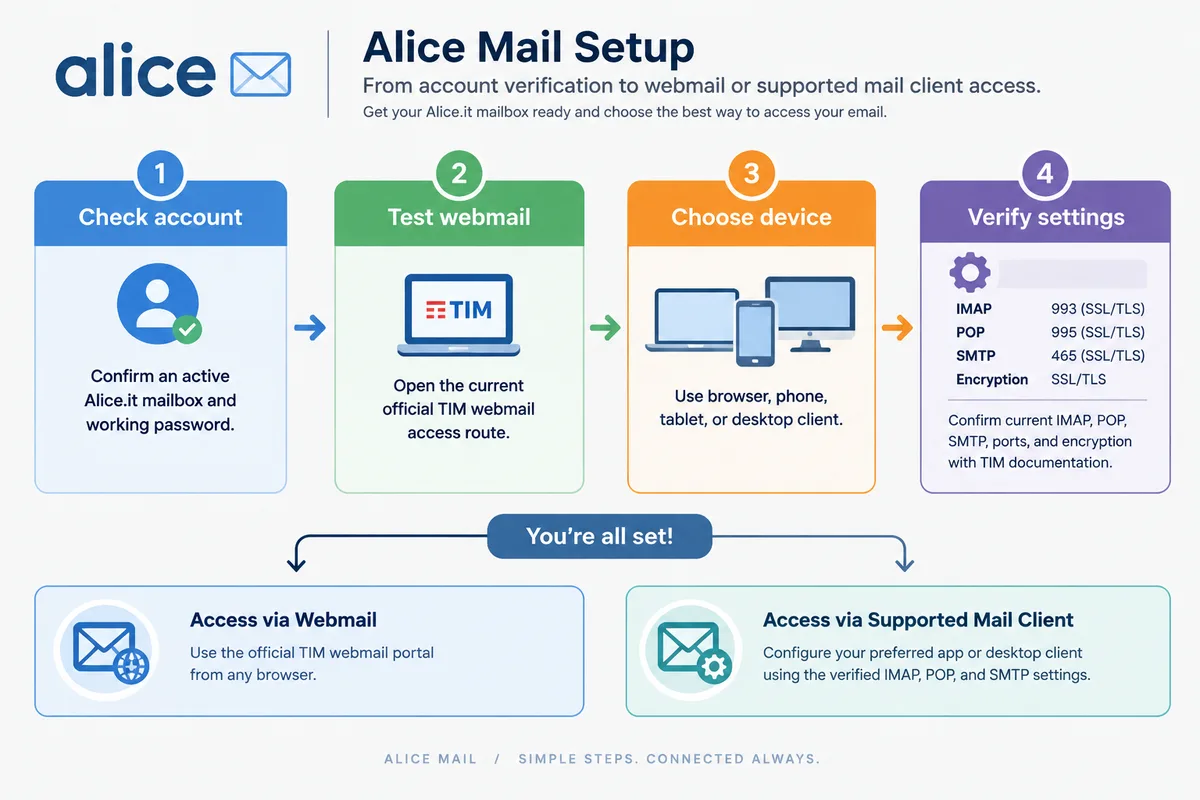
Alice Mail setup starts with an active mailbox, a working password, and an access method that the current provider supports. Browser access is the least fragile route; desktop and mobile clients add server, port, encryption, and authentication settings that must be confirmed against TIM’s current documentation.
Start with webmail before configuring Outlook, Apple Mail, Gmail, or another application. This separates an account problem from a device problem.
IMAP, POP, and SMTP serve different roles. IMAP normally keeps messages synchronized across devices, POP may download messages locally depending on its options, and SMTP handles outgoing mail.
Do not enter guessed server values. Hostnames, ports, encryption requirements, and authentication rules can change, and an obsolete setting may permit login while silently breaking sending or synchronization.
Instead, open TIM’s current mail assistance pages and copy the values shown for the specific account type. If the documentation does not list a setting, treat it as unverified rather than borrowing values from an unrelated provider.
Mobile access deserves its own check because an app may retain a failed password for hours. The dedicated explanation of Alice Mail access on a phone is more useful when the issue involves an iPhone, Android device, notifications, or account removal.
How Do You Recover an Alice Mail Password?
Recover an Alice Mail password through the official TIM recovery route linked from the login page or TIM assistance area. The process may request the mailbox address and recovery information associated with the account; if those details are outdated, the provider’s support channel becomes the decisive route.

Recovery is not the same as changing a password after a successful login. A user who can open the inbox should change credentials inside the authenticated account area, while a locked-out user must use the provider’s unauthenticated recovery flow.
Check the exact address first, including its domain ending. An address typed as @tim.it will not recover an @alice.it mailbox unless it is genuinely the same account identity recorded by the provider.
A form that does not recognize the address does not prove that every message has vanished. It may indicate an outdated recovery record, a retired access route, a suspended mailbox, or a mismatch between the old brand and the current platform.
Use this dedicated resource for Alice Mail password recovery steps. Never send a password, recovery code, or identity document to an address found in a suspicious email.
Everyday Use: Messages, Folders, Search, and Attachments
Everyday Alice Mail use covers composing, replying, forwarding, deleting, searching, and sorting messages from webmail or a configured client. The exact button names can differ between a legacy Alice Mail view and current TIM webmail, while the underlying tasks remain familiar.
Write the recipient last when the message contains sensitive information. This small habit reduces accidental sending before the attachment or wording is ready.
Use CC for visible secondary recipients and BCC when recipients should not see one another’s addresses. Drafts are useful, yet they should not become the only copy of important information.
Attachments deserve a separate check. File-size limits, blocked extensions, and recipient restrictions can prevent delivery even when the message itself is accepted.
Folders reduce noise when they reflect an actual workflow: invoices, travel, family, or work can be more useful than dozens of decorative categories. Search by sender, subject, date, or distinctive text before assuming a message has disappeared.
Spam handling needs inspection rather than blind deletion. A legitimate message can be filtered incorrectly, while repeated unwanted mail may require a rule, sender block, or provider-level report.
Keeping an Alice Mail Account Secure
Secure Alice Mail access requires a unique password, protected recovery details, careful phishing checks, and controlled sessions on shared devices. Provider features such as alerts, PIN protection, or two-step verification depend on the current TIM platform and should be enabled only where the official account settings offer them.
A strong password is longer and harder to predict than a reused name, date, or familiar phrase. Store it in a reputable password manager if remembering it creates pressure to reuse it elsewhere.
A convincing login page can defeat a strong password if the address is fake. Inspect the domain before entering credentials, especially after an urgent message claims that the mailbox will be closed or suspended.
Suspicious attachments deserve the same caution. Do not open an unexpected file merely because it appears to come from a known contact; that account may itself be compromised.
Common Alice Mail Problems and Practical Fixes
Most Alice Mail failures become easier to isolate when you separate the account, browser, network, device, and mail-client layers. Start with official webmail, then test a private browser window, remove stale credentials, inspect current service information, and escalate blocked or compromised accounts to TIM support.
| Symptom | Likely layer | First action |
|---|---|---|
| Password rejected | Account or saved credential | Type the address and password manually, then use official recovery. |
| Login loop | Browser session | Clear relevant cookies or test a private window. |
| Webmail unavailable | Network or provider | Try another network and check TIM service notices. |
| App cannot synchronize | Client settings | Verify current IMAP or POP and SMTP values. |
| Messages are missing | Folder or filter | Search spam, trash, archives, and automatic folders. |
| Outgoing mail fails | SMTP or attachment | Check authentication, encryption, and file restrictions. |
Browser errors often disappear after outdated cookies are removed. Do not delete the whole browser profile first; isolate the mailbox session and preserve useful saved information.
Mailbox capacity can also affect new delivery, especially when several devices retain large attachments or local copies. Delete unnecessary messages only after exporting anything that must be kept.
A mail app that suddenly stops working may be using an old password stored in its keychain. Remove the account only after confirming the password and checking whether unsent drafts exist locally.
Contact TIM when recovery does not recognize the address, the account appears suspended, or unauthorized activity continues after a password change. The official provider can verify account status in ways a third-party troubleshooting page cannot.
FAQ About Alice Mail
What happens to locally stored Alice Mail messages when I remove the account from a mail app?
Messages synchronized through IMAP generally remain on the mail server, but local drafts, downloaded POP messages, and app-only folders may be lost when the account is removed. Save or export important messages and drafts before deleting the account from the device.
How can I back up Alice Mail messages before changing mail apps?
Export important messages in a standard format such as EML, or copy them to another account while the mailbox is still accessible. Include attachments and keep a separate copy of essential drafts, since synchronization is not the same as a backup.
Why does an Alice Mail message remain stuck in the Outbox?
A message can remain in the Outbox because of a failed SMTP connection, an expired saved password, or an attachment that exceeds the permitted size or type. Save the message text, remove or replace the attachment, and retry it after the outgoing-mail connection is working.
What to Remember
- Use the complete mailbox address, not an assumed customer username.
- Verify current TIM settings before configuring IMAP, POP, or SMTP.
- Test webmail before blaming a phone or desktop application.
- Use official recovery for forgotten passwords and blocked accounts.
- Protect the mailbox with a unique password and cautious session management.
For Alice Mail, the decisive check is simple: identify the address, test the official webmail route, then compare the failing device with a known working path. The inexpensive fix is often removing stale credentials; the safe escalation is TIM support if recovery and fallback access both fail.